This article isn't about Cloudflare DNS.
It isn't about changing nameservers in a registrar panel.
It isn't about dig, nslookup, or propagation checkers.
At least, not at first.
The story begins with a single human habit.
You type a name.
Along the way, we'll encounter recursive resolvers, root servers, TLD servers, authoritative nameservers, A records, CNAMEs, MX records, NS records, TTLs, ISPs, and Anycast.
But none of those pieces appear because we decided to memorize DNS terminology.
They appear because the previous answer was incomplete.
One question leads to another.
One lookup exposes a new dependency.
One architectural choice changes who is allowed to answer.
By the end of the article, my hope is that you'll understand something more useful than a list of record types.
You'll understand why the internet needs a distributed directory at all—and why the pieces of that directory look the way they do.
If you've ever wondered why changing DNS sometimes feels instant and sometimes feels like waiting three days, this is one possible path.
Here's the journey we're about to take.
A human-readable name
       │
       ▼
Who do I ask?
       │
       ▼
Recursive resolver
       │
       ▼
Root
       │
       ▼
TLD
       │
       ▼
Authoritative nameserver
       │
       ▼
What kind of answer?
       │
       ▼
A / CNAME / MX / NS
       │
       ▼
How long is the answer valid?
       │
       ▼
TTL
       │
       ▼
Who controls the truth?
       │
       ▼
Nameservers
Don't worry if some of these concepts are unfamiliar.
By the end of the article, each one will feel like the natural consequence of the previous one.
A follow-up post will focus on the practical side. This one stays with the theory—the constraints that make the practice necessary.
The problem
Imagine the following request.
You open a browser and type tomashernandez.com.
There is nothing particularly interesting about it. Millions of people do this every day. If this action appeared in a product demo, there would probably be little reason to question it.
Now suppose the network underneath that action only understood numbers.
I am deliberately stating something obvious. Computers address each other with IP addresses. Humans remember names. Those two facts create a translation problem.
The extreme version of the problem is useful because it makes one property easy to see: every useful website visit begins with the same kind of question.
What IP address corresponds to this name?
Before continuing, let us make a few assumptions about the system:
- People should not have to memorize IP addresses.
- The same name should resolve consistently for users around the world.
- The mapping from name to address can change over time.
- Returning a slightly outdated answer for a short period is often acceptable.
- We will gradually uncover who participates in the lookup and reconsider the design whenever one of these assumptions is stressed.
These assumptions are intentionally restrictive. A closed network with a single hosts file, a corporate intranet with its own resolver policy, or a system that must never serve stale data may require a different design. The purpose of the example is not to invent a universally correct directory, but to examine how DNS decisions follow from a particular set of constraints.
At first, the obvious response is a local dictionary.
If a name maps to an IP, store the mapping somewhere the machine can read.
On a single computer, that can work. Windows and Linux both have a hosts file that can force a name to resolve to a specific address:
127.0.0.1 tomashernandez.com
That line says: if anyone on this machine asks for tomashernandez.com, answer 127.0.0.1.
It is useful for local experiments. It is not useful as the directory of the internet.
A hosts file on every device does not scale. It cannot stay synchronized. It cannot reflect ownership changes, migrations, or failures across the whole network.
This suggests that the browser is not the only problem. The more fundamental problem is shared knowledge.
The next question is therefore not how to remember one mapping, but who is allowed to answer on behalf of the internet.
Who do I ask?
The previous section ended with a different question.
Instead of asking how a browser stores IP addresses, we started asking who can answer a name lookup for everyone.
At first glance, the answer seems obvious: ask the website's server.
But that creates a circular dependency.
To ask the website's server, you already need its address.
So the client cannot start there.
Something else has to accept the question first.
That intermediary has a name.
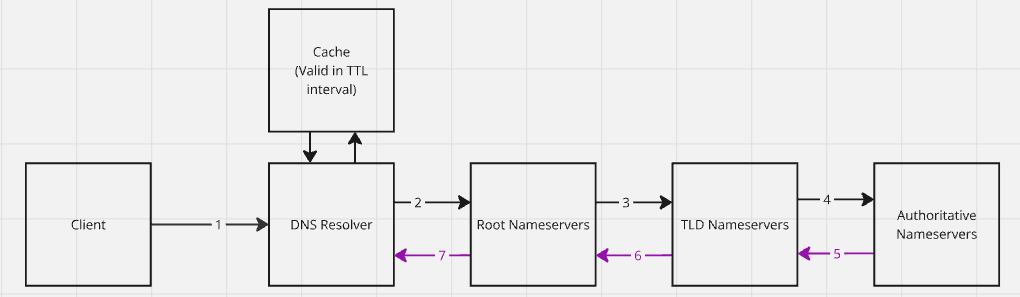
It is called a recursive DNS resolver.
A recursive resolver receives queries from client machines—browsers, phones, operating systems—and takes responsibility for finding an answer. It does not need to know every domain in the world. It needs to know how to ask the next server that does.
Conceptually, the resolver behaves like this:
- Ask a root server where to look next.
- Ask the corresponding TLD server where to look next.
- Ask the authoritative nameserver for the final answer.
- Return that answer to the client.
- Remember the answer for a while, so the next identical question is cheaper.
Most internet users use a recursive resolver provided by their ISP—the internet service provider that connects them to the network. Public alternatives also exist: Google Public DNS, OpenDNS, Cloudflare DNS, and others.
Notice how we arrived here. We did not start by asking, "Should we use Cloudflare DNS?" We simply observed that a client cannot ask a server whose address it does not yet know. Once that circularity became visible, an intermediary became a natural consequence rather than a product decision.
Of course, introducing a recursive resolver immediately raises another question.
Where does the resolver begin?
Start at the root
Reusing a previous answer sounds almost perfect—but first we need a place to begin when nothing is cached yet.
The recursive resolver's first stop is a root nameserver.
The root's job is deliberately narrow.
It does not know the IP address of tomashernandez.com.
It knows which servers are responsible for the next piece of the name: the top-level domain.
In tomashernandez.com, that piece is com.
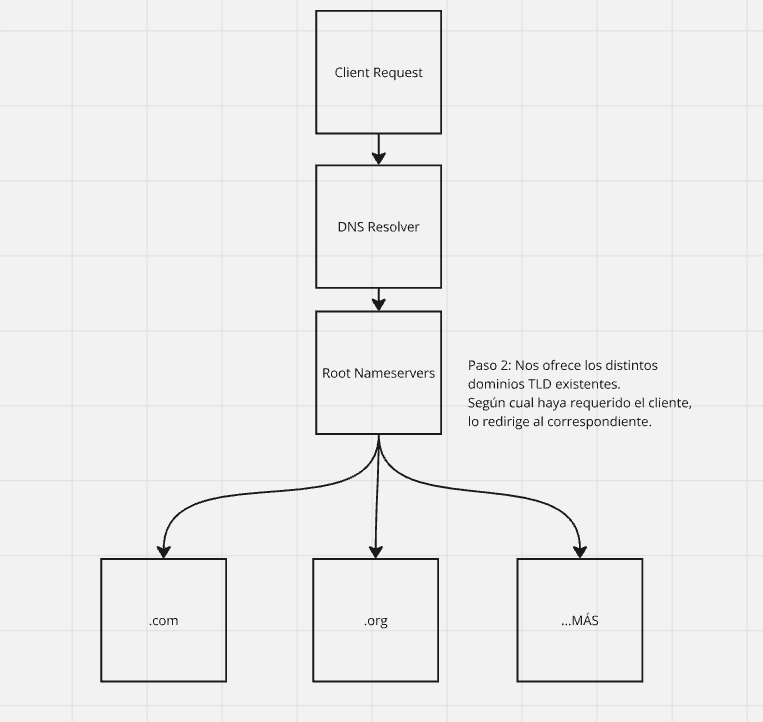
There are 13 root server addresses, replicated across many physical machines around the world. The resolver does not need a unique machine for every continent. It needs a way to reach a healthy root that can answer quickly.
That raises a more interesting question than "how many root servers exist?"
How can the same IP address be served from many places at once?
One address, many places
If the same IP appears in many locations, ordinary unicast intuition breaks.
In unicast thinking, an IP belongs to one destination.
In the root system, many destinations share the same address and stay synchronized.
The routing method that makes this workable is Anycast.
Anycast is a way of advertising the same address from multiple nodes and letting the network deliver each request to a nearby healthy instance. Latency is one common selection criterion. Congestion avoidance and DDoS resilience are practical consequences of the same idea: traffic is spread across mirrored nodes instead of forced through a single machine.
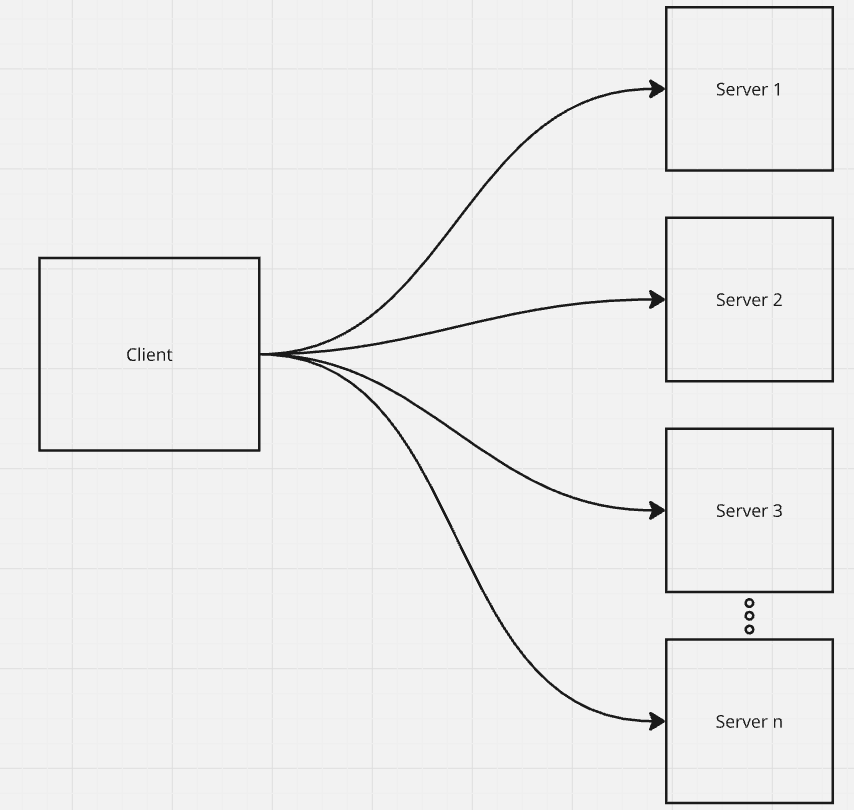
The mirrors have a contract to keep: the same address must answer with the same authoritative information, and they must stay synchronized.
Once Anycast has delivered the resolver to a root server, the root's answer is still incomplete.
It does not give us tomashernandez.com.
It gives us the next place to ask.
Narrow the name
The next place is a TLD nameserver.
A TLD nameserver stores information for all domains that share a common suffix after the final dot: .com, .net, .org, and every other top-level domain.
Management of these namespaces is coordinated through IANA—the Internet Assigned Numbers Authority.
At this point the resolver knows more than it did at the beginning.
It still does not know the final IP.
It knows which servers claim to be authoritative for the specific domain.
Ask the owner of the name
The final stop in the happy path is an authoritative nameserver.
This is the server that is allowed to answer for a specific domain. If it has the requested record, it returns it.
That sentence hides an important fork.
The authoritative answer is not always an IP address.
Sometimes it is another name.
So the recursive resolver may receive one of two useful outcomes:
- An address for the name—an A record (or AAAA for IPv6).
- An alias that points somewhere else—a CNAME—which requires another lookup.
Those are not random record types invented for certification exams.
They are different answers to the same underlying question: what does this name mean?
What does this name mean?
Address
The A record is the most fundamental DNS answer for the web because it associates a domain with an IPv4 address. The A stands for Address. If the host has an IPv6 address, the corresponding record is AAAA.
| Domain | Record type | Value | TTL |
|---|---|---|---|
| tomashernandez.com | A | 127.0.0.1 | 14400 |
The @ symbol, when used in DNS configuration UIs, usually means the apex of the domain—the bare name itself. In the example above, a lookup for tomashernandez.com would resolve to 127.0.0.1.
You can simulate the same idea locally with a hosts entry, as we saw earlier. The difference is scope: hosts is local fiction; an A record is part of the public answer for that name.
One more property matters in production.
A domain can publish more than one A record. Traffic can then be distributed across multiple addresses. A common simple technique for this is round-robin load balancing.
An A record answers a direct question: where is this name?
A CNAME answers a different one.
Alias
A CNAME (Canonical Name) says that one name is an alias for another name.
This is useful when a subdomain should follow another domain rather than independently store an IP. A common example is www.tomashernandez.com as a CNAME to tomashernandez.com, while tomashernandez.com itself remains an A record at the apex.
Important constraints follow from that design:
- A CNAME points to a name, not directly to an IP address.
- Resolving a CNAME eventually requires reaching an A or AAAA record.
- Sharing the same destination IP does not mean sharing the same page. Alias identity is about naming, not application routing.
Once aliases exist, email creates yet another question.
A website and a mailbox for the same domain do not have to live on the same machine.
An MX record (Mail Exchange) tells sending servers where to deliver email for a domain, according to SMTP.
| Domain | Record type | Priority | Value | TTL |
|---|---|---|---|---|
| tomashernandez.com | MX | 10 | mailhost.tomashernandez.com | 14400 |
| tomashernandez.com | MX | 20 | mailhost2.tomashernandez.com | 14400 |
Lower priority values are preferred. If mailhost.tomashernandez.com is unavailable or overloaded, mail can fall through to mailhost2.tomashernandez.com.
Creating the actual mailboxes happens on the mail server. MX only answers the routing question: where should SMTP send messages for this domain?
MX targets must themselves resolve to address records—A or AAAA. They should not depend on a CNAME as the final hop in the way people sometimes casually assume.
We now know how a name can mean an address, an alias, or a mail destination.
One question remains unfinished.
Who is allowed to publish those answers in the first place?
Delegation
An NS record (NameServer) declares which authoritative nameservers are responsible for a domain.
In other words, NS records tell the rest of the internet where the truth for that domain lives.
| Domain | Record type | Value | TTL |
|---|---|---|---|
| tomashernandez.com | NS | ns1.exampleserver.com | 14400 |
A domain normally has multiple NS records—primary and secondary nameservers. If they are misconfigured, users may be unable to load the site or application at all.
NS records must not point to a CNAME. Delegation needs a stable, directly addressable target.
This is the point where "DNS" and "nameserver" stop being interchangeable slang.
DNS is the system.
A nameserver is a participant in that system: a server that stores the records for a domain—A, CNAME, MX, NS, and the rest—and answers authoritatively for them.
Choosing nameservers is choosing who manages that truth.
How long is the answer valid?
Every successful lookup creates a temptation.
If we already asked, why ask again immediately?
The recursive resolver therefore caches answers.
Caching solves duplicated work. It also introduces a new problem we have already met in other systems: freshness.
How long may a remembered DNS answer be trusted?
That duration is the TTL—Time To Live—measured in seconds.
When the TTL expires, clients and resolvers request a fresher copy of the record.
If you plan a DNS change, a common operational recommendation is to lower the TTL first—often to about five minutes (300 seconds)—make the change, wait for the old TTL to drain, and later raise it again—often back toward a day (86400 seconds). The exact numbers are policy, not law. The constraint underneath them is stable: short TTLs make changes visible sooner and increase query load; long TTLs reduce load and delay corrections.
If a record does not specify a TTL, many systems fall back to a default on the order of 240 minutes (14,400 seconds). Treat that as a common default, not a universal constant.
TTL is not a side note in DNS.
It is the mechanism that makes a globally replicated directory practical without requiring every lookup to traverse root → TLD → authoritative on every click.
What breaks, and why it feels slow
Once the pieces exist, the remaining questions are the ones operators ask under pressure.
How long does a DNS change take to propagate?
It can take up to roughly 72 hours in pathological cases, though many changes are visible much sooner. The delay depends on the ISP resolvers involved, the registrar and authoritative configuration, the previous and new TTL values, the record type, and ordinary network behavior. Tools such as DNSChecker help observe how different regions currently answer.
The important mental model is not a magic countdown. It is caches expiring at different times in different places.
What is NXDOMAIN?
NXDOMAIN means Non-Existent Domain: the name could not be resolved to a valid answer because, from the DNS system's point of view, it does not exist. In Chrome, a common presentation of related failures is DNS_PROBE_FINISHED_NXDOMAIN.
That error is not "the website is slow."
It is "the directory has no usable answer for this name."